

Your brain is not a storage device. It’s a processing engine. The professionals who consistently produce more, think more clearly, and seem to forget less aren’t blessed with better memories. They’ve built external systems to carry information so their working memory stays clear for the work that actually matters.
Cognitive offloading is the formal term for this. Psychologists use it to describe the practice of using the environment, tools, or other people to handle cognitive tasks your brain would otherwise have to manage internally. It’s not a new concept. Writing things down is cognitive offloading. So is setting a reminder. But the difference between average performers and high-output ones is how deliberately and systematically they do it.
Here’s how to build that system.
1. Treat Your Working Memory Like RAM, Not a Hard Drive
Working memory, the mental space where you hold and manipulate information in the moment, is genuinely limited. Research by cognitive psychologist George Miller in the 1950s established the rough boundary at seven items, plus or minus two. More recent work by Nelson Cowan suggests the real limit for chunked, meaningful items is closer to four. Either way, it’s not much.
When you try to hold too much in working memory (a list of follow-ups, a half-formed idea, a thing you need to check before Thursday), you degrade your ability to think about anything else. The cognitive load research on this is consistent: holding information in mind actively competes with processing new information. So every item you’re mentally juggling is costing you something in reasoning quality.
The fix is simple but requires discipline. Anything that enters your head and doesn’t need to be acted on right now gets written down immediately, not eventually. The capture system doesn’t matter much (notebook, phone, voice memo, task app) as long as you trust it and actually review it. The moment you trust the system, your brain stops trying to hold the item.
2. Capture the Context, Not Just the Task
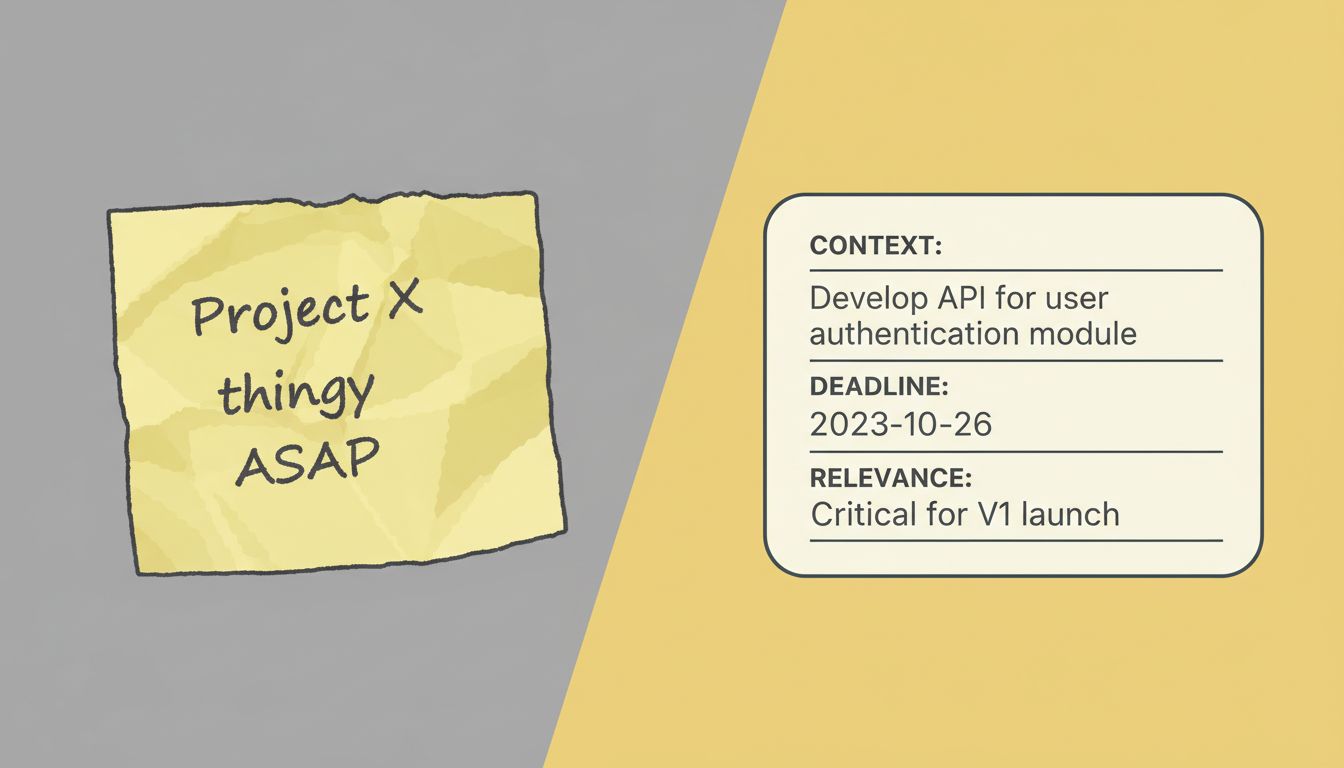
Most to-do lists fail because they record what without recording why or when it matters. You write “follow up with Jamie” and three days later have no idea what that was about or whether it’s still relevant.
High-output professionals capture context at the moment of capture, not later when memory has already degraded. “Follow up with Jamie, re: Q3 budget approval, she needs answer before Thursday kickoff” is a complete unit of information. You can act on it without reconstructing anything.
This takes a few extra seconds at capture time and saves multiples of that time at retrieval. It also means your system stays trustworthy. A task list full of cryptic notes is a cognitive burden, not a relief.
3. Design Friction Into the Forgetting Process
The goal isn’t just to capture information. It’s to surface the right information at the right moment without having to think about it. This is where most personal systems break down. People capture things faithfully and then never see them again.
The solution is to design your offloading system around retrieval, not just storage. A few concrete approaches that work:
- Inbox zero for tasks: Keep your capture list short enough that reviewing it daily is fast. If it takes more than a few minutes to scan, you’ll avoid it.
- Contextual anchoring: Store items where you’ll encounter them naturally. A reminder tied to a location, a sticky note on your monitor for today’s priority, a recurring calendar block for weekly review.
- Naming conventions: Use consistent language in your notes so search actually works. If you always write client names the same way, finding everything related to a client takes seconds.
The point is that offloading information to a system you rarely check is just moving the anxiety, not resolving it.
4. Use Checklists for Repeated Processes, Not Just Big Projects
Atu Gawande’s work (documented in The Checklist Manifesto) showed that surgical checklists dramatically reduced complications in operating rooms. The insight wasn’t that surgeons were incompetent. It was that even highly trained professionals operating under pressure skip steps, and a checklist removes the cognitive requirement to remember what those steps are.
The same principle applies to your weekly work. Any process you repeat more than a few times per month is a candidate for a checklist. Onboarding a new client. Preparing for a performance review. Running a sprint retrospective. Writing a post-mortem. You know from experience what the steps are. Write them down once and stop reconstructing them from scratch each time.
This isn’t about dumbing down your work. It’s about reserving your attention for the parts of the process that actually require judgment, rather than burning it on the parts that don’t.
5. Build a Weekly Review Into Your System
A capture system without a review loop is just a graveyard for good intentions. The weekly review is the practice that keeps the whole system honest. It’s the moment where you close loops, update priorities, and clear out anything that’s no longer relevant.
The mechanics are less important than the consistency. Many people do this on Friday afternoon or Sunday evening. The review should answer a few questions: What did I commit to this week that’s unfinished? What’s coming up next week that needs preparation? What can I delete from my list entirely?
Deadlines and calendar pressure can make weekly reviews feel like a luxury. They’re not. They’re the mechanism that prevents small oversights from becoming expensive problems.
6. Offload Decisions, Not Just Information
Cognitive offloading isn’t limited to facts and tasks. You can also offload decisions by building rules in advance. If you have a standing policy that you don’t schedule meetings before 10am, you don’t have to evaluate each meeting request individually. The decision has already been made.
High-output professionals have surprisingly many of these rules: default response templates for common requests, a standing Friday block for deep work, a threshold for what gets delegated versus handled personally. The rules feel like constraints from the outside. From the inside, they feel like relief.
The goal is to convert recurring judgment calls into automatic responses wherever the stakes are low enough to justify it. That frees up real decision-making capacity for the situations where nuance actually matters.
7. Don’t Mistake Tool Complexity for System Quality
There’s a version of cognitive offloading that becomes its own cognitive burden: elaborate note-taking systems with nested tags, cross-linked databases, and color-coded priority matrices. The system becomes a project in itself.
Simpler systems get used. Used systems work. A plain text file reviewed daily beats a sophisticated app reviewed never. The power user is not always winning against the person with a simpler, more consistent approach.
Start with the minimum: a capture inbox, a way to set date-based reminders, and a weekly review. Add complexity only when you hit a real limit, not in anticipation of one you might never reach.





