Most engineers treat a load balancer like a ceiling fan: point it at the servers, flip the switch, and assume it runs correctly forever. The configuration panel exists, technically, but the defaults are probably fine. This is a reasonable assumption for a ceiling fan. For a load balancer, it is how you end up with a production system making consequential routing decisions based on assumptions nobody on your team ever made.
The defaults are not neutral. They encode specific tradeoffs, often ones that made sense for a different workload, a different era, or a different company’s infrastructure. Understanding what those defaults actually do is not optional maintenance. It is the difference between a system that works and one that merely appears to work until it doesn’t.
Round Robin Sounds Fair. It Is Not.
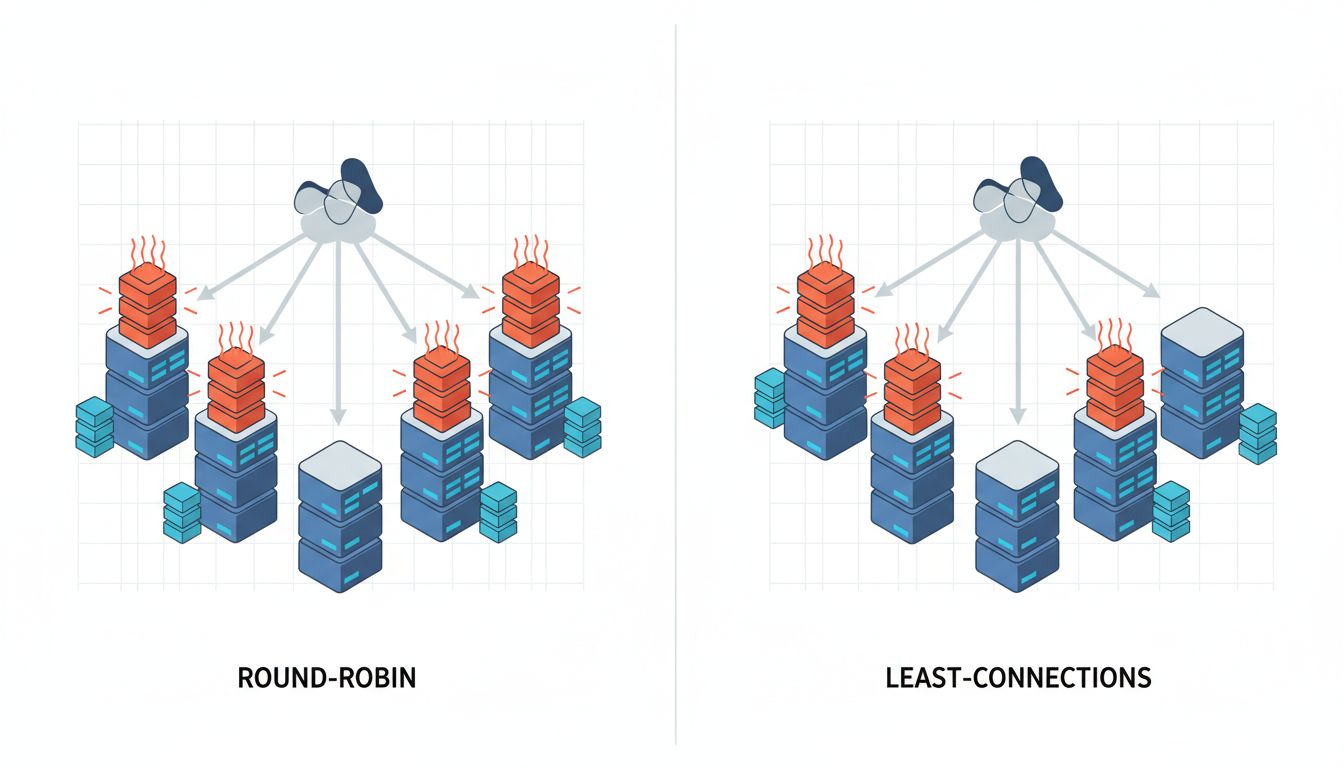
The most common default load balancing algorithm is round robin: request one goes to server A, request two goes to server B, request three goes back to A. It is simple, predictable, and wrong for most modern workloads.
Round robin assumes requests are roughly equivalent in cost. In 2005, serving a mostly-static web page, that assumption held up reasonably well. In a contemporary system where one request triggers a database lookup and another spawns a multi-step LLM inference pipeline, treating them as equivalent is a category error. Round robin happily routes your most expensive request to the server that is already processing three other expensive requests, while the idle server waits its turn.
The alternative is least-connections routing, which sends new requests to whichever server currently has the fewest active connections. This is meaningfully smarter, and many load balancers support it, but it is almost never the default. HAProxy defaults to round robin. Many AWS ALB configurations that teams set up in a hurry stay on round robin indefinitely. Nginx’s upstream module defaults to round robin. You have to opt into smarter behavior explicitly.
For services with highly variable request costs, least-connections can dramatically improve throughput without touching a single line of application code. The performance improvement is sitting in a dropdown menu.
Sticky Sessions Are a Time Bomb With a Polite Fuse
Session persistence, often called sticky sessions, is a feature where the load balancer remembers which server handled a given client’s first request and routes all subsequent requests from that client to the same server. It sounds harmless and is sometimes genuinely necessary, for applications that store session state locally on the server rather than in a shared cache.
The problem is that sticky sessions are sometimes enabled by default, or enabled once during initial setup and never revisited, or enabled to fix a specific bug years ago and then forgotten. The result is a load balancer that is not actually balancing load. It is routing traffic by cookie or IP hash, and some servers end up with disproportionate traffic while others sit underutilized.
This matters most during failure events. When a server goes down, all of its sticky clients suddenly need to be rerouted. Depending on how the load balancer handles this, those clients may lose session state, hit errors, or get redistributed unevenly across the remaining servers. The load spike hits right when your system is already degraded. Sticky sessions transform a partial failure into a much messier one.
The correct fix for stateful sessions is to externalize state, storing it in Redis or a database rather than in server memory, and then remove the stickiness. But many systems never make that migration. They accumulate sticky session configuration as infrastructure debt, and nobody notices until a server goes down at 2am.
Health Checks That Check the Wrong Thing
Load balancers continuously probe backend servers to determine if they are healthy. A server that fails health checks gets removed from rotation. This mechanism is foundational to high availability. It is also frequently misconfigured in ways that make it unreliable.
The most common misconfiguration is a health check endpoint that responds 200 OK regardless of the actual state of the application. The load balancer pings /health, the server returns 200, and traffic keeps flowing, even if the database connection pool is exhausted, the application is deadlocked, or a background worker has silently failed. The server is technically alive. The application is not.
A well-designed health check endpoint verifies that the application can actually do its job: it checks database connectivity, confirms that critical dependencies are reachable, and validates that key subsystems are operational. It returns 200 only when the service is genuinely ready to handle traffic. This takes slightly more effort to build than returning a hardcoded 200, and many teams never do it.
The inverse problem also exists: health checks configured with thresholds so sensitive that a momentary spike in response time removes a healthy server from rotation. This can cause cascading failures where load balancers pull servers out just as traffic increases, reducing capacity exactly when it is needed most.
Timeouts Are a Policy, Not a Technical Detail
Every load balancer has timeout settings: how long to wait for a backend server to respond before giving up and trying another. These values are a policy decision about how your system should behave under load. They are almost never treated that way.
The defaults vary by product but are often generous, sometimes absurdly so. A load balancer waiting 60 seconds for a backend response before timing out is not being patient; it is accumulating open connections that each hold memory, file descriptors, and state. During a slowdown, generous timeouts turn a degraded backend into a fully overwhelmed one. Every slow request ties up a connection slot while new requests keep arriving.
Tighter timeouts force a different tradeoff: fail fast, return an error to the client, and free up resources. This surfaces problems more visibly and prevents cascading slowdowns. It also requires that your application and client code handle errors gracefully rather than waiting indefinitely. That is a harder system to build, but it is a more honest one about what is actually happening.
The right timeout values depend entirely on your workload characteristics. A system serving interactive user requests has very different requirements than a system handling background batch jobs. The load balancer has no way to know which one you have. It ships with a generic default, and you need to replace it with a deliberate decision.
Your Load Balancer Is Already Decided
None of this is a criticism of load balancers as products. HAProxy, Nginx, and AWS ALB are sophisticated, well-engineered tools. The defaults they ship with are reasonable starting points for a generic workload. The problem is that generic is not what most production systems are.
The practical audit is not complicated. Pull up your load balancer configuration and answer four questions: What routing algorithm is active, and does it match how variable your request costs actually are? Are sticky sessions enabled, and do you genuinely need them? Do your health check endpoints verify real application state or just that a process is running? And are your timeout values a conscious decision or an inherited default?
For most teams, at least one of those answers will be uncomfortable. That is normal. These settings accumulate without ceremony. But a load balancer is not passive infrastructure. It is making routing decisions on every request your system handles, and it is making them according to rules that were set, consciously or not, by whoever clicked through the setup wizard first.
That person may not have known what workload you’d be running three years later. Now you do.