You Already Have a Database
Every developer has a moment where they decide a project needs a database. Requirements solidify, data gets more complex, and someone opens a terminal and types brew install postgresql. It’s almost reflexive. But before that first CREATE TABLE, ask yourself what the filesystem you’ve been using all along actually does.
It stores structured data. It supports hierarchical organization. It enforces permissions. It handles concurrent reads. On most modern systems, it maintains metadata including creation time, modification time, and file size. On many systems, it supports atomic operations through careful use of rename. Some filesystems support extended attributes that let you store arbitrary key-value pairs alongside your files.
That’s not a folder full of text files. That’s a database with a forty-year head start on reliability engineering.
What a Filesystem Actually Is
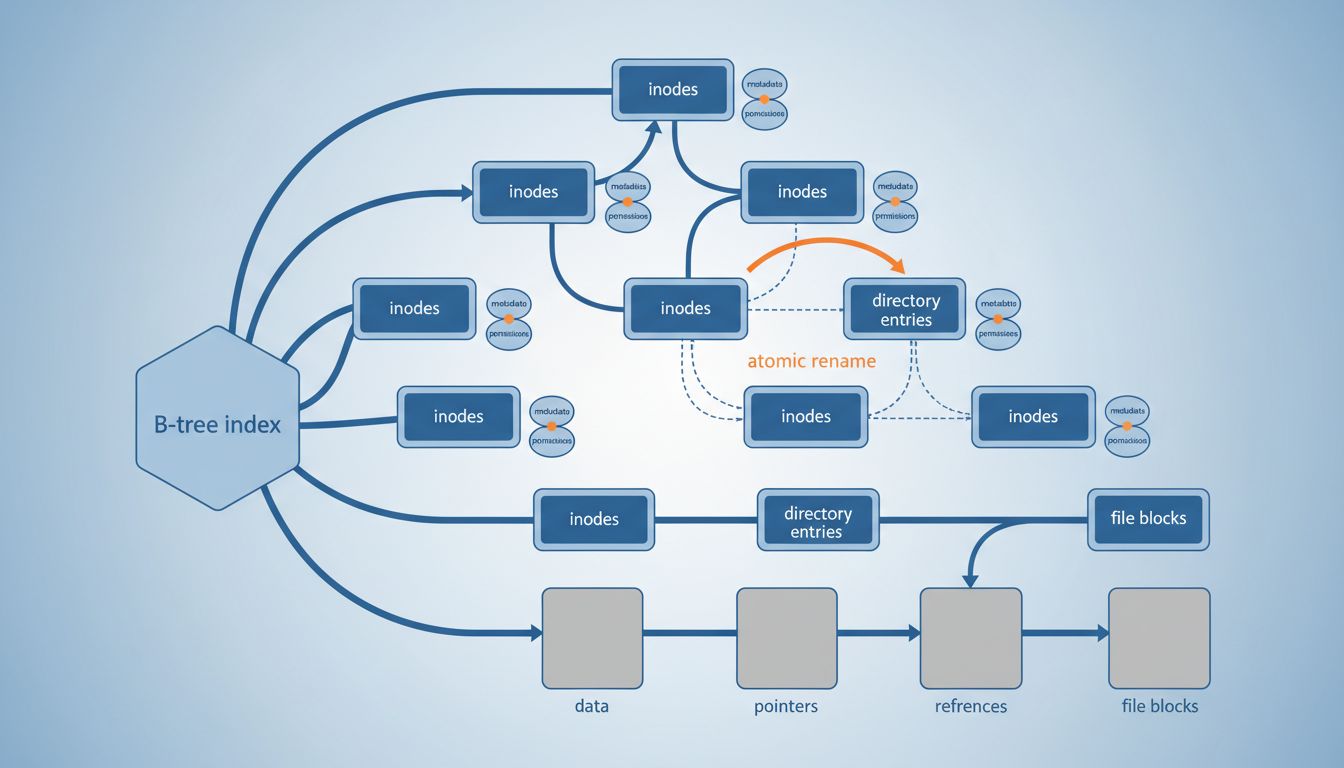
A filesystem is, at its core, an index. When you create a file, the operating system records its name, its location on disk (as one or more inodes pointing to data blocks), and a set of metadata. When you list a directory, you’re querying that index. When you look up a file by name, you’re doing a key-value lookup. The directory itself is a data structure, typically a B-tree or hash table depending on the filesystem.
ext4, the default filesystem on most Linux servers, uses an HTree structure (essentially a two-level hash tree) for large directories. HFS+ and APFS on macOS use B-trees throughout. NTFS on Windows uses a B+ tree structure called the Master File Table. These aren’t casual choices. The engineers who designed these systems made the same tradeoffs database engineers make: optimizing for lookup speed, write throughput, and space efficiency.
ZFS and Btrfs go further. Both are copy-on-write filesystems, meaning they never overwrite data in place. Instead, they write new data to a new location and atomically update the pointer. This is exactly the same technique that gives databases like SQLite their crash safety guarantees. If your power dies mid-write, you don’t get a corrupted file. You get either the old version or the new version, never a half-written hybrid.
The Operations You Get for Free
Here’s what a POSIX filesystem hands you without a single library dependency:
Atomic rename. The rename() syscall is guaranteed atomic on POSIX systems. This means you can write to a temporary file, verify the contents, then rename it into place, and no reader will ever see a partial write. This is how many production systems implement safe config file updates and atomic log rotation. SQLite uses this pattern extensively.
Directory listing as a query. ls -lt is a query sorted by modification time. find . -name "*.log" -mtime -1 is a filtered query over last modification date. These aren’t tricks. They’re the filesystem’s native query interface.
Namespace isolation. Directories give you namespaces. A file named config in /app/production/ is completely separate from /app/staging/config. You get hierarchical namespacing without a schema.
Built-in access control. Unix permissions and ACLs are access control lists at the storage layer. You don’t have to implement WHERE user_id = ? checks if the OS enforces who can open which files.
Hard links and reference counting. A hard link lets multiple directory entries point to the same inode. Deleting one entry doesn’t remove the data until all links are gone. This is reference counting, the same mechanism Python uses for memory management, baked into the storage layer.
None of this is obscure. It’s the default behavior of every Unix system since the 1970s.
Where the Filesystem Genuinely Wins
For certain access patterns, a filesystem outperforms a relational database, not because the filesystem is smarter, but because it removes layers.
Consider blob storage. If you’re storing images, videos, binary files, or any large unstructured object, putting them in a database usually means copying them through a database engine that was optimized for structured row operations. The filesystem, by contrast, can hand the data directly to the kernel’s sendfile syscall, which transfers bytes from disk to network without ever copying them into userspace. This is why Nginx serves static files faster than almost any application server: it relies on the OS to do the heavy lifting.
Log files are another clear win. Append-only writes to a file are extremely fast because they don’t require random seeks. Systems like Kafka learned this lesson and built their entire architecture around log-structured storage on disk. The filesystem’s sequential write performance often saturates disk bandwidth in ways that databases with their transaction overhead cannot.
Content-addressable storage is a natural fit. Git stores every object (commits, trees, blobs) as a file named by the SHA-1 hash of its contents, organized into a two-level directory structure (the first two characters of the hash form the directory name, the rest the filename). This gives Git O(1) lookup for any object by hash, deduplication for free (identical content produces an identical hash and thus the same file), and a directory listing that doubles as an index. Git is, in many ways, a database. It just uses the filesystem as its storage engine.
Where the Filesystem Falls Short
The filesystem is not a relational database. This sounds obvious but it’s worth being precise about what that means in practice.
Joins don’t exist. If you need to find all orders belonging to a customer, and then join that to a product catalog to calculate total revenue, a filesystem has nothing useful to offer you. You’d have to read files manually and join them in application code, which is slow and error-prone.
Transactions spanning multiple files are not guaranteed. You can atomically replace one file using rename. You cannot atomically update five files in different directories. If your application needs to update several related pieces of data as a unit, you need a proper transaction log, which means a database.
Query expressiveness is limited. find and ls cover simple cases. The moment you need “all records where field A is between X and Y AND field B matches this pattern,” you’re writing application code that reimplements what SQL does natively.
Directory performance degrades at scale. Most filesystems handle directories with thousands of entries fine. Directories with hundreds of thousands of small files become a different problem, both for listing performance and for filesystem metadata overhead. Deleting a row is one of the hardest things a database can do, but deleting thousands of small files has its own costs at the OS level.
The Systems That Already Know This
The most interesting evidence that the filesystem is underrated as a database comes from how many production systems treat it as one deliberately.
Maildir, the email storage format designed by Daniel Bernstein in the 1990s, stores each email message as a separate file in a directory structure. The filename encodes metadata including delivery time and unique identifiers. The format was designed specifically to avoid file locking by exploiting atomic rename. Many production mail servers still use it.
Prometheus, the monitoring system, stores its time-series data in custom chunks on disk organized by a block structure. The TSDB format uses the filesystem directly rather than embedding another database engine. Each block is a directory containing index files, chunk files, and metadata, all managed by Prometheus itself.
SQLite, despite being a full relational database engine, often performs best when its database file is on a local filesystem rather than network storage. The SQLite documentation explicitly discusses how filesystem behavior affects database guarantees. The engine trusts the filesystem for certain durability properties.
Docker image layers are stored as directory trees on disk. The overlay filesystem driver composes multiple filesystem layers into a single view. Container images are essentially a versioned filesystem, and the storage driver is the database.
Practical Guidance for Choosing
The filesystem is the right storage layer when your access pattern matches what it’s optimized for: lookup by name, sequential reads or writes, blob storage, or hierarchical namespacing. It’s the wrong choice when you need multi-key queries, cross-record transactions, or complex relationships between entities.
A useful test: can you describe your query as a file path? If so, you probably want a filesystem. “Give me the config file for the production environment” maps to /configs/production/app.json. “Give me all users who signed up last week and haven’t made a purchase” does not map to any path. The first is a filesystem problem. The second is a SQL problem.
Many applications that reach for a database early in development would benefit from staying with the filesystem longer. Configuration storage, artifact caching, log aggregation, feature flag files, static content, session files in server-side rendering contexts, and small datasets that are read often and written rarely are all cases where a filesystem is simpler, faster to operate, and requires no additional infrastructure.
The overhead of running and maintaining a database is real: backups, connection pooling, schema migrations, query optimization, index maintenance. If your access pattern doesn’t demand relational features, that overhead buys you nothing.
What This Means
The filesystem is not a primitive that you graduate from when your application matures. It’s a storage engine with specific strengths: atomic writes via rename, high throughput for sequential access, built-in namespacing, no network roundtrip, and zero operational overhead. For the right workloads, these strengths are decisive.
The developers who reach for a database by default and the developers who avoid databases entirely are both making the same mistake, treating the choice as categorical rather than matching the tool to the access pattern. Knowing precisely what the filesystem gives you, and where it stops being enough, is what separates thoughtful infrastructure design from habit.
The next time you’re about to run CREATE TABLE, spend sixty seconds asking whether a directory would do. Sometimes the answer is yes.