

The failure is almost always embarrassing in hindsight. The application ran perfectly on your laptop for weeks. You deploy it, and within minutes the error logs fill up. The root cause, when you find it, is never the clever new feature you wrote. It’s something boring: a missing environment variable, a timing assumption, a resource limit nobody documented.
This pattern is so common it has acquired its own genre of developer folklore. But the “works on my machine” problem isn’t a mystery. It has a precise explanation, and understanding it changes how you build software.
Your Laptop Is a Controlled Environment That Lies to You
A developer’s local machine is a finely tuned instrument, optimized for building software comfortably. It has generous memory, a fast CPU, a low-latency connection to everything, and most importantly, it has been configured by the same person who wrote the code. That person made dozens of small decisions, one by one, over months, that created a fragile bubble of conditions under which the application works.
Production shares almost none of those conditions. The server is running dozens of other processes competing for memory. The database is on a different machine, with real network latency between them. The file system has different permissions. The timezone might differ. The operating system version is often months or years behind what a developer has locally.
The subtlest problem is implicit dependencies. When you install a library on your laptop, it sits alongside every other library you’ve ever installed. Applications can inadvertently rely on one of those other libraries being present without ever declaring the dependency explicitly. In production, starting from a clean slate, that undeclared dependency is simply absent. The application breaks in a way that looks completely unrelated to the actual cause.
Environment Variables and the Configuration Gap
Configuration is the most common single cause of localhost-to-production failures. Specifically, the problem is that local environments accumulate configuration that never gets written down.
A developer sets a database password in their shell profile eighteen months ago and forgets about it. The application reads it silently every time it starts. Nobody documents it because it feels too obvious to mention. When the application is deployed to a server that was stood up last week, the variable doesn’t exist. The application crashes at startup with a cryptic error about a null connection string.
The twelve-factor app methodology, published by Heroku engineers and widely referenced since 2011, identified environment-based configuration as one of the core disciplines for building software that behaves consistently across environments. The insight is simple: anything that varies between deployments should be stored in the environment, not the code, and every required variable should be documented and validated at startup. Applications that crash immediately with a clear message about a missing variable are actually better-behaved than applications that silently proceed and fail in confusing ways later.
Concurrency, Timing, and the Single-User Illusion
Local development is almost always single-user. When you test your application, you are the only person making requests. This hides an entire class of bugs that only appear when multiple users interact with the system simultaneously.
Consider a simple inventory check: read the available quantity, verify it’s greater than zero, then decrement it. On localhost, this works every time. In production, under load, two requests can read the same quantity simultaneously, both see a value above zero, and both proceed to decrement. Now you’ve sold the same item twice. This is a classic race condition, and it is invisible in single-user testing.
Timing bugs are similar. A function that makes three sequential network calls might complete in 80 milliseconds locally, where the database is on the same machine. In production, each call crosses a real network, each adding 20 to 50 milliseconds of latency. A timeout set at 200 milliseconds fails regularly in production and never fails locally. The code didn’t change. The environment did. This is also why fixing a production bug is harder than writing the original code: you cannot reproduce the environment in which the failure occurred.
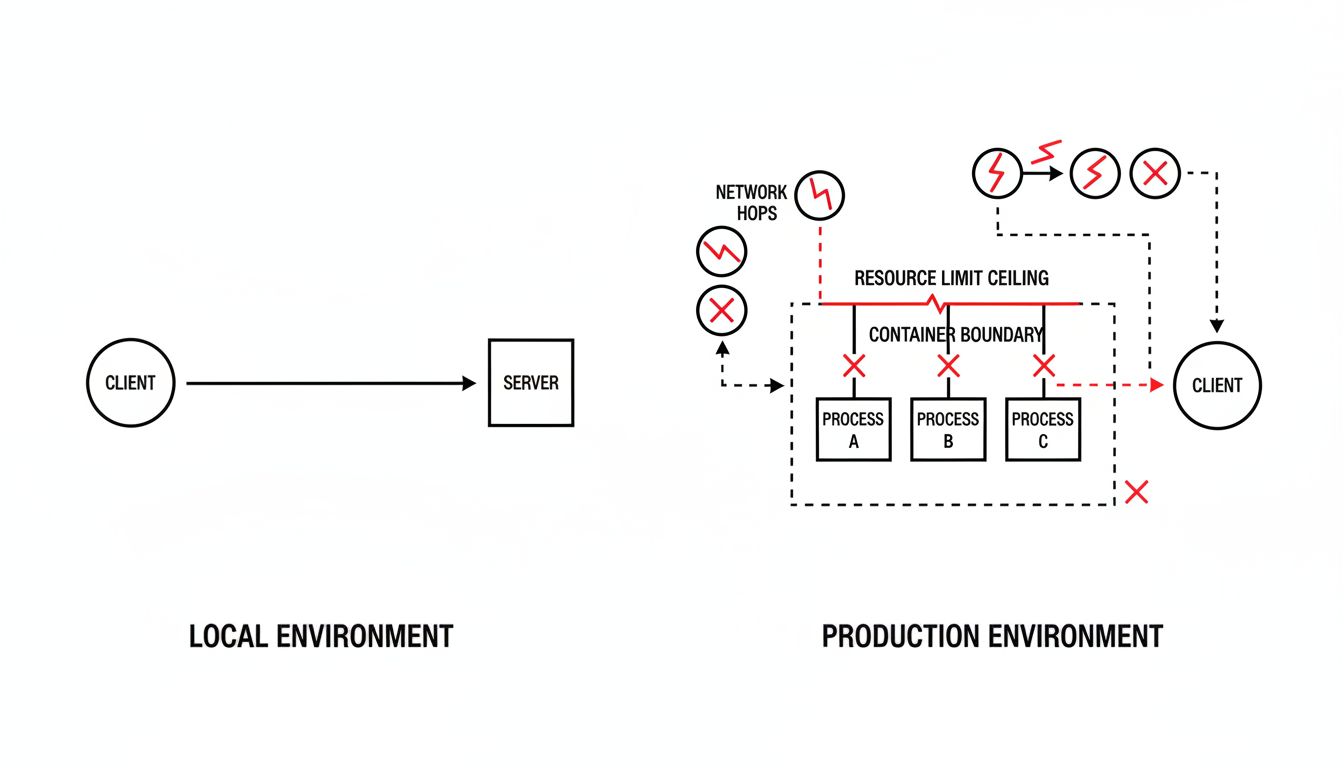
Resource Limits Are Where Assumptions Become Visible
Development machines rarely impose resource constraints. Production environments almost always do, whether through container limits, cloud instance sizing, or operating system defaults.
The most common surprise is memory. An application that loads configuration data, caches frequently accessed records, and buffers log output might consume 600 megabytes of RAM in normal operation. A developer’s laptop has 16 gigabytes; this is invisible. A container configured with a 512-megabyte limit will kill the process without warning the moment it crosses the threshold. From the outside, this looks like an intermittent crash with no useful error message.
File descriptor limits cause similar failures. Linux systems set a default maximum number of open files per process, typically 1024 on older configurations. An application that opens a database connection for each incoming request can exhaust this limit under moderate traffic. Locally, running a handful of test requests, you’d never come close to the limit. Under real load, the application starts failing to open new connections and logging errors that point nowhere near the actual constraint.
Closing the Gap Requires Treating Environments as Code
The practical answer to the localhost-production gap is to stop treating the environment as a background condition and start treating it as part of the artifact you ship.
Container technology, particularly Docker, was partly motivated by exactly this problem. When you define the environment in a Dockerfile, you are writing down the assumptions your application makes about where it runs: the base OS, the installed libraries, the user permissions, the exposed ports. This doesn’t eliminate all environmental differences, but it eliminates a large class of them by making the environment reproducible.
Infrastructure-as-code tools extend this further. When the production database, the cache layer, and the network rules are all defined in version-controlled configuration, the gap between what you tested against and what you deployed to narrows considerably. The environment becomes something you can inspect, diff, and reason about.
The remaining gap is usually traffic patterns and data. Production has real users doing unexpected things with real data at volumes development never sees. No local setup fully replicates this, which is why staged rollouts, feature flags, and observability tooling matter. The goal isn’t to make localhost identical to production. It’s to make the differences explicit and small enough that you can reason about them before you deploy, not after.
The developers who get burned least by this problem aren’t the ones with the most sophisticated local setups. They’re the ones who have learned to be skeptical of their own assumptions, who ask what their code depends on that isn’t written down anywhere, and who treat “it works on my machine” as the beginning of a question, not the end of one.